

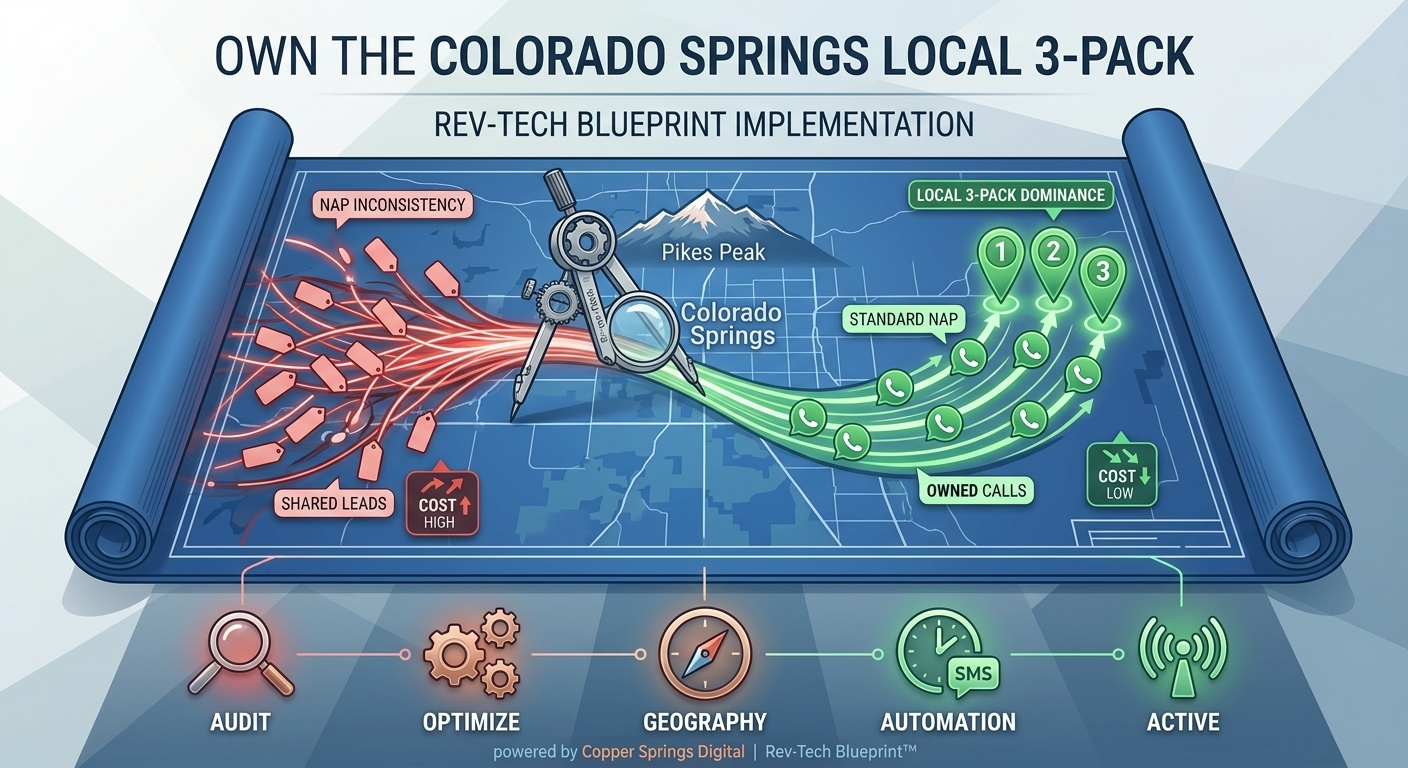
Why Your Colorado Springs Business Isn’t Ranking in the Google Map Pack (And How to Fix It)
If you operate a local service business in Colorado Springs—whether you’re running a commercial roofing crew, a busy dental practice, an HVAC company, or a boutique law firm—your primary growth engine isn’t national web traffic. It’s the Google Local 3-Pack.
The Map Pack appears at the very top of Google search results for high-intent queries like “HVAC repair near me” or “best personal injury attorney in Colorado Springs.” Positioned above standard organic search links, these three highlighted business listings capture over 44% of all total clicks for localized search queries.
When your business dominates the Map Pack, your phone rings consistently with exclusive, qualified prospective clients. When you’re buried on page two or languishing outside the top three, you end up forced to buy expensive, shared leads from third-party lead brokers who sell the exact same customer inquiry to four of your direct competitors.
At Copper Springs Digital, we engineer local digital infrastructure using our Rev-Tech Blueprint™. Through our work with local service providers across El Paso County and the Front Range, we’ve identified the exact structural, technical, and operational reasons why local businesses drop out of Map Pack visibility—and the systematic steps required to reclaim top placement.
Below is a complete, field-tested guide to diagnosing why your Colorado Springs business isn’t ranking in the Google Map Pack and how to fix it step-by-step.
The Hidden Cost of Map Pack Invisibility
Before diving into technical fixes, it is crucial to understand the mathematical reality of local search intent in Colorado Springs:
-
High Buyer Intent: Users searching for local service providers via Google Maps or mobile local search are rarely “window shopping.” Over 76% of people who conduct a local search on their smartphone visit a physical business or contact a service provider within 24 hours.
-
Zero-Click Searches: Google continuously updates its interface to keep users within its ecosystem. A significant percentage of local searchers never click through to a traditional website at all—they call directly from the Map Pack listing, tap for driving directions, or request an online booking.
-
Cost-Per-Acquisition Disparity: A business relying on pay-per-click (PPC) ads or third-party lead aggregators in competitive local industries often pays between $80 and $180 per lead. Conversely, an established Map Pack listing generates high-intent inbound calls at a fraction of that customer acquisition cost (CAC).
If your business isn’t occupying one of those top three Map Pack slots, you are effectively ceding your local market share to competitors who may offer inferior service but possess superior local search infrastructure.
5 Critical Reasons Your Business Isn’t Ranking in the Map Pack
Ranking in the Google Map Pack requires more than just filling out a basic Google Business Profile (GBP). Google’s local algorithm evaluates listings based on three core pillars: Proximity, Prominence, and Relevance.
When a business fails to rank, it almost always stems from breakdown across five key areas:
1. Severe NAP (Name, Address, Phone) Inconsistencies Across the Web
Google’s algorithm relies on web scrapers to verify that your business is legitimate, active, and located where you claim it is. It does this by cross-referencing your Name, Address, and Phone Number (NAP) across hundreds of online directories, mapping data aggregators, local citations, and social platforms (such as Yelp, YellowPages, Chamber of Commerce, and local trade association directories).
If your business is listed as “Apex Heating & Air Conditioning LLC” on Google, but appears as “Apex Heating & Air” on Facebook, and lists an old office address or former phone number on an outdated Yelp profile, Google’s trust score in your data drops.
Key Takeaway: Ambiguity creates distrust in Google’s local algorithm. If the algorithm cannot verify your exact business details with 100% certainty across external platforms, it will hesitate to present your business in the top three map results.
2. Misconfigured Categories and Missing Primary Attributes
Your Google Business Profile primary category is the single most influential ranking factor for establishing search relevance.
Many business owners select a broad or slightly inaccurate primary category when creating their account. For instance, selecting “Contractor” instead of “Roofing Contractor”, or choosing “Medical Clinic” instead of “Cosmetic Dentist”, severely dilutes your listing’s relevance for high-intent search queries.
Furthermore, neglecting secondary categories limits your ability to rank for peripheral services. A law firm that only lists “Attorney” as its primary category misses out on targeted search queries for “Personal Injury Attorney”, “Estate Planning Attorney”, or “Criminal Defense Lawyer”.
3. Lack of Hyper-Local Signal Alignment on Your Website
Your Google Business Profile does not exist in a vacuum. Google continuously evaluates the website URL linked to your profile to verify your local authority and operational scope.
If your linked landing page is a generic, thin homepage that lacks local geo-signals—such as specific references to Colorado Springs neighborhoods (Briargate, Broadmoor, Rockrimmon, Falcon, Fountain), embedded local maps, structured schema markup, and dedicated service-area content—Google will view your site as lacking local relevance compared to competitors who explicitly target these micro-markets.
4. Low Review Velocity and Unmanaged Customer Feedback
Review volume, star rating, and review recency directly impact the Prominence component of Google’s local ranking algorithm.
However, many business owners misunderstand how reviews function. Having fifty 5-star reviews from three years ago will not maintain your map rankings today. Google favors review velocity—a continuous, steady stream of fresh, verified customer reviews.
Furthermore, listing profiles that lack keywords within the review text (e.g., “Apex fixed our furnace in Briargate quickly!”) and profiles where the business owner never replies to reviews show Google that the listing is stagnant.
5. Proximity Filters and Incorrect Service Area Configurations
Google prioritizes proximity to the searcher. If a user is searching from downtown Colorado Springs, Google naturally leans toward showing verified businesses near the city center or within the immediate search radius.
However, if your business operates as a Service Area Business (SAB)—meaning you travel to clients’ homes or job sites (like plumbers, roofers, or mobile detailing)—incorrectly setting your physical address or failing to configure hidden service boundaries can cause Google’s proximity filter to hide your listing outside your immediate zip code.
The Step-by-Step Fix: Reclaiming Your Map Pack Dominance
Rebuilding your local search presence requires an engineering approach. At Copper Springs Digital, we utilize our Rev-Tech Blueprint™ to systematically eliminate technical flaws and establish permanent local authority.
Here is the exact framework to audit, optimize, and scale your Google Map Pack visibility in Colorado Springs.
+--------------------------------------------------------------------+
|                   THE REV-TECH LOCAL SEARCH ENGINE                 |
+--------------------------------------------------------------------+
|  1. AUDIT & CLEANSE  --->  Fix NAP & Duplicate Citations           |
|  2. PROFILE OPTIMIZE --->  Refine Primary/Secondary Categories     |
|  3. GEO-INFRASTRUCTURE---> Build Localized Landing Pages & Schema  |
|  4. REVIEW AUTOMATION--->  Deploy 2-Way SMS Review Workflows       |
|  5. ACTIVE SIGNALS   --->  Geotagged Posts & Geo-Grid Audits     |
+--------------------------------------------------------------------+
Step 1: Conduct a Comprehensive Local Citation Clean-Up
To restore Google’s trust in your business identity, eliminate every NAP discrepancy across the web.
-
Audit Existing Citations: Utilize local citation auditing tools or partner with a specialized agency to scan major data aggregators (Neustar/Localeze, Data Axle, Foursquare) and tier-1 directories for incorrect business names, old addresses, or disconnected phone numbers.
-
Establish a Strict NAP Standard: Define an exact syntax for your business information down to the abbreviation level (e.g., deciding whether to use “Suite 100” or “Ste 100”) and enforce this exact string everywhere.
-
Suppress Duplicate Listings: Duplicate profiles on Google Maps, Yelp, or Bing dilute your review equity and confuse search crawlers. Claim, merge, or delete all duplicate listings.
Step 2: Fully Optimize Your Google Business Profile Architecture
Treat your Google Business Profile as an interactive digital storefront rather than a passive contact listing.
-
Primary Category Alignment: Research your top three ranking competitors in Colorado Springs using local SEO tools to identify their exact primary category. Set your primary category to match the highest-converting, most specific industry term available.
-
Leverage Secondary Categories: Add up to 9 relevant secondary categories to capture related search intent without diluting your core focus.
-
Complete All Data Fields: Fill out 100% of available profile fields, including business hours, holiday hours, appointment links, attributes (e.g., wheelchair accessible, onsite service), and a detailed, keyword-rich business description (750 characters max).
-
Upload High-Resolution Geo-Relevant Media: Regularly upload high-quality photographs of your team, branded vehicles, completed job sites in Colorado Springs, and office interior/exterior. Authenticated, original images perform vastly better than stock photography.
Step 3: Align Your Website Architecture with Hyper-Local Signals
Your website must back up the claims made on your Google Business Profile.
                   +--------------------------------+
                   |  Google Business Profile (GBP) |
                   +---------------+----------------+
                                   |
                                   v
                   +--------------------------------+
                   |   Geo-Targeted Landing Page   |
                   +---------------+----------------+
                                   |
         +-------------------------+-------------------------+
         |                                                   |
         v                                                   v
+------------------------+                          +------------------------+
| Local Schema Markup    |                          | Local Community Content|
| (JSON-LD GeoCoordinates|                          | (Neighborhoods, Proof, |
|  & Service Categories) |                          |  Embedded Google Map)  |
+------------------------+                          +------------------------+
-
Dedicated Local Service Area Pages: If you serve multiple areas along the Front Range (e.g., Colorado Springs, Monument, Fountain, Castle Rock), build distinct, high-quality landing pages for each location rather than lumping them into a generic list.
-
Embed Local Schema Markup: Implement LocalBusiness structured data (JSON-LD) directly into your site’s code. Explicitly define your exact latitude and longitude, business address, service radius, operating hours, and service categories for search engine crawlers.
-
Embed Google Maps Infrastructure: Embed an interactive Google Map pointing directly to your verified Google Business Profile location on your contact and location landing pages.
-
Hyper-Local Content Integration: Incorporate references to local landmarks, regional challenges (such as hail restoration or seasonal furnace maintenance in high-altitude environments), and specific neighborhood service records directly into your copy.
Step 4: Build an Automated Review Generation Engine
To maintain high review velocity and build undisputed prominence, you must remove friction from the customer feedback process. Relying on manual follow-up emails yields low response rates.
-
Implement Instant SMS Workflows: Integrate your website or CRM (ServiceTitan, JobNimbus, Mindbody, Clio) with an automated post-service text messaging platform. Sending a review request via text message within 15 to 30 minutes of completing a service generates up to 3x higher conversion rates than email.
-
Provide Direct Review Links: Send customers directly to your GBP review prompt overlay via a shortened URL, eliminating multi-step navigation.
-
Incorporate Keywords in Owner Responses: Respond to every single review (both positive and negative) within 24 to 48 hours. Naturally incorporate service terms and local neighborhood references in your responses (e.g., “Thank you for trusting us with your dental implant procedure here in Colorado Springs!”).
Step 5: Leverage Active Google Business Profile Engagement Features
Google rewards listings that demonstrate active, ongoing merchant engagement.
-
Publish Weekly Google Updates: Treat Google Updates like micro-blog posts. Share recent project highlights, seasonal promotional offerings, customer case studies, and informational articles weekly. Include a direct Call-To-Action (CTA) button such as “Call Now” or “Book Online”.
-
Utilize the Q&A Module: Proactively populate your listing’s “Questions & Answers” section with your most frequently asked client questions and provide clear, authoritative answers.
-
Enable Direct Messaging: Turn on Google’s native chat feature for direct customer inquiries, ensuring your sales team or intake staff monitors notifications to maintain a fast response time (under 5 minutes).
Measuring Success: Moving Beyond Simple Keyword Tracking
Standard organic rank tracking tools often give local business owners a false sense of security by reporting a single static rank position for a city. However, local search rankings vary block by block based on user location.
To accurately monitor your Map Pack trajectory, deploy Geo-Grid Rank Tracking.
  [ 5 ]  [ 4 ]  [ 3 ]  [ 3 ]  [ 4 ]    <-- Rank position at 5-mile radius
  [ 4 ]  [ 2 ]  [ 1 ]  [ 2 ]  [ 3 ]
  [ 3 ]  [ 1 ] ( B )  [ 1 ]  [ 2 ]    ( B ) = Your Business Physical Location
  [ 4 ]  [ 2 ]  [ 1 ]  [ 2 ]  [ 3 ]
  [ 5 ]  [ 3 ]  [ 2 ]  [ 3 ]  [ 4 ]    <-- Rank position shrinks as proximity expands
Geo-grid tracking overlays a visual map grid over Colorado Springs, checking your exact rank position at specific map coordinates (e.g., every 0.5 miles). This reveals the geographic footprint of your visibility:
-
Green Nodes (Ranks 1–3): Your business dominates the Map Pack in these specific neighborhoods.
-
Yellow/Red Nodes (Ranks 4+): Searchers in these areas are seeing your competitors instead.
As you implement the Rev-Tech Blueprint™ framework, your geo-grid performance map expands, turning red and yellow nodes green across the entire city and surrounding region.
The Rev-Tech Advantage: Stop Buying Leads, Start Owning Your Pipeline
Many local service business owners fall into the trap of viewing digital marketing as an ongoing expense rather than a capital investment in proprietary revenue infrastructure.
Buying shared leads from third-party platforms keeps your business on a perpetual marketing treadmill. The moment you stop paying the broker, your lead flow drops to zero.
By taking control of your Google Map Pack presence, optimizing your site architecture for high-conversion performance, and automating customer review generation, you build a permanent asset that generates predictable, high-ticket inbound calls on complete autopilot.
Is Your Colorado Springs Business Ready to Dominate Local Search?
At Copper Springs Digital, we don’t build generic websites or hand off superficial monthly reports filled with vanity metrics. We construct fully integrated, high-converting digital revenue engines for HVAC contractors, law practices, dental clinics, and home service providers throughout Colorado Springs.
Contact our team today to request a comprehensive Local Search Infrastructure Audit and discover how the Rev-Tech Blueprint™ can systematically scale your local market share.