

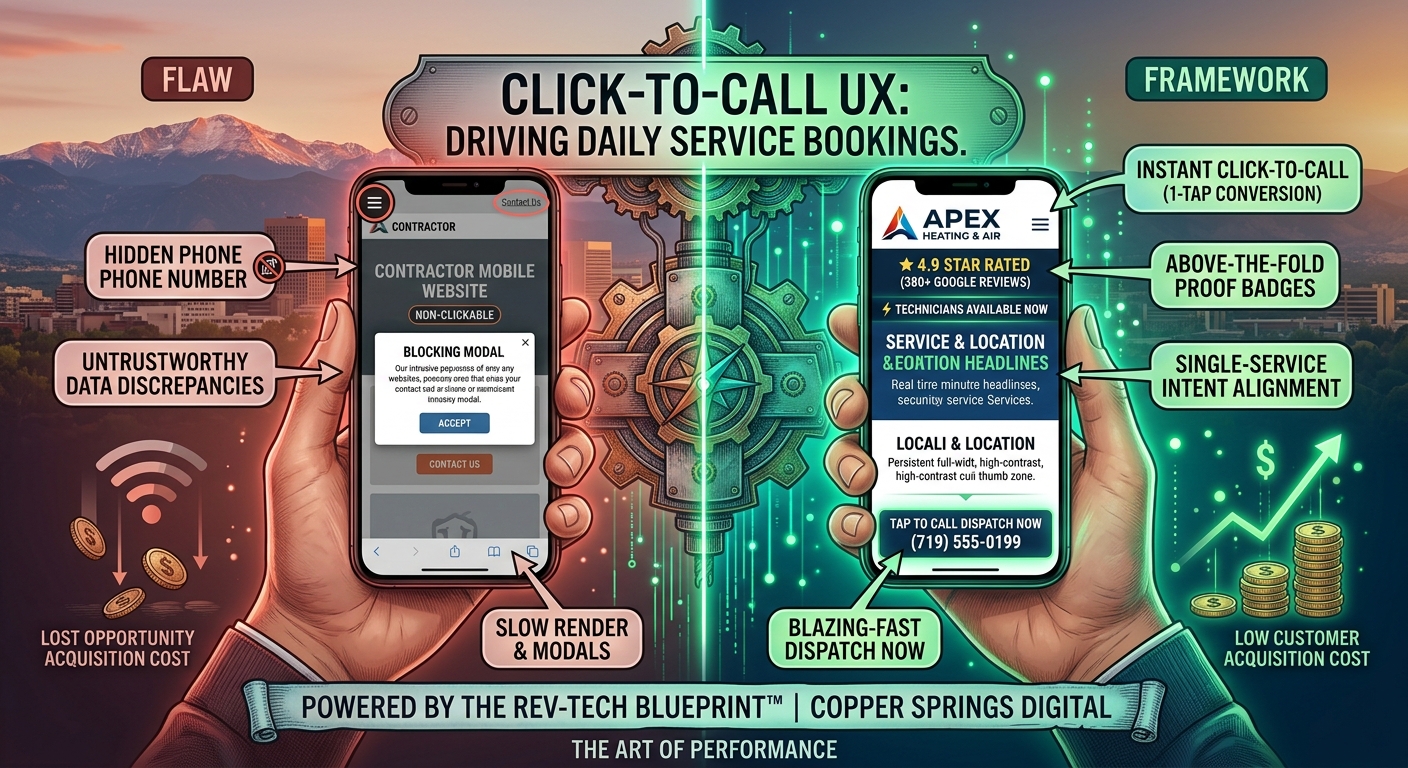
Click-to-Call Architecture: How Mobile UX Drives Daily Service Bookings
When a homeowner’s water heater ruptures in the middle of the night in Northgate, or a commercial rooftop HVAC unit cuts out during an August heatwave in Downtown Colorado Springs, the customer’s buying behavior changes instantly.
They do not open a laptop, read through five-page company histories, or fill out a multi-step contact form to wait for a call back tomorrow morning. They reach for their smartphone, tap a search result or Google Map pin, and look for one immediate action trigger: a direct, single-tap phone call button.
In the emergency and local service trades—plumbing, HVAC, electrical, roofing, garage door repair, and towing—over 82% of all localized search traffic originates on mobile devices. For these high-intent buyers, the phone call is not just a secondary touchpoint; it is the primary conversion event.
Yet, a surprising number of local contractor websites treat mobile design as an afterthought. They scale down desktop sites onto smaller screens, hide phone numbers inside hamburger navigation menus, force users to highlight and manually copy digits, or distract prospects with slow-loading pop-ups. Every extra tap, pinch-to-zoom movement, or second of page delay creates friction—and in the local service trades, friction equals abandoned calls and lost jobs.
At Copper Springs Digital, we design mobile web infrastructure around our Rev-Tech Blueprint™. Through rigorous user experience (UX) testing across Front Range service markets, we have demonstrated that optimizing a contractor’s mobile interface for instant Click-to-Call (CTC) triggers drastically reduces customer acquisition costs (CAC) while scaling daily booked dispatches.
Below is an exhaustive, field-tested guide to mastering mobile Conversion Rate Optimization (CRO), building high-speed call architecture, and converting mobile search traffic into daily booked appointments.
The Psychology of the Emergency Service Searcher
To build a high-converting mobile interface, you must first understand the mental state of a mobile searcher in an urgent or high-intent situation.
THE MOBILE SERVICE BUYER JOURNEY
┌────────────────────────────────────────────────────────────────────────┐
│  TRIGGER: Acute Problem (Broken Furnace, Leaking Roof, Locked Out)     │
└─────────────────────────────────┬──────────────────────────────────────┘
                                  │
                                  ▼
┌────────────────────────────────────────────────────────────────────────┐
│  ACTION: Immediate Mobile Search ("emergency furnace repair near me")  │
└─────────────────────────────────┬──────────────────────────────────────┘
                                  │
                                  ▼
┌────────────────────────────────────────────────────────────────────────┐
│  EVALUATION (3-5 Seconds): Mobile Landing Page Load                    │
│  • Is this company local?                                              │
│  • Are they open / available right now?                                │
│  • Can I reach a human being instantly?                                │
└─────────────────────────────────┬──────────────────────────────────────┘
                                  │
                                  ▼
┌────────────────────────────────────────────────────────────────────────┐
│  CONVERSION: Single-Tap "Click-to-Call" Engagement                      │
└────────────────────────────────────────────────────────────────────────┘
When a consumer experiences an acute service problem, their cognitive load is high, their patience is low, and their focus is narrowed down to three immediate requirements:
- Reassurance: Immediate confirmation that your company solves their exact issue locally in Colorado Springs, Fountain, Monument, or Falcon.
- Availability: Explicit verification that your crews are active and available now (e.g., “24/7 Live Dispatch” or “Technicians Available in El Paso County”).
- Zero Friction: A clear, impossible-to-miss, tap-to-call button that triggers their phone’s dialer without requiring typing, copying, or form fills.
If your mobile page fails to deliver on these three points within three seconds, the user bounces back to the search results to tap the next competitor’s listing.
The Economics of Inbound Phone Calls vs. Web Form Inquiries
Not all inbound leads carry equal value. For local service trades, inbound phone calls convert into booked revenue at significantly higher rates than passive online form submissions.
COMPARATIVE LEAD CONVERSION METRICS: CALLS VS. FORMS
┌──────────────────────────────────┬──────────────────┬──────────────────┐
│ Metric                           │ Web Form Inbound │ Direct Phone Call│
├──────────────────────────────────┼──────────────────┼──────────────────┤
│ Average Close / Booking Rate     │ 10% - 18%        │ 55% - 78%        │
├──────────────────────────────────┼──────────────────┼──────────────────┤
│ Average Speed to Engagement      │ 15 - 120 Minutes │ Instant (0 Secs) │
├──────────────────────────────────┼──────────────────┼──────────────────┤
│ Price Sensitivity of Customer    │ High (Price Shopping) | Low (Needs Fix Now)│
├──────────────────────────────────┼──────────────────┼──────────────────┤
│ Lead Decay Rate (After 5 Mins)   │ 80% Drop-off     │ Zero Decay       │
└──────────────────────────────────┴──────────────────┴──────────────────┘
Why Phone Calls Deliver Superior ROI
- Higher Intent: A prospect willing to place an immediate phone call is substantially further along in their buying decision than a user filling out a casual quote form.
- Real-Time Qualification: Your CSR (Customer Service Representative) or dispatch team can qualify the job, evaluate geographic proximity, assess emergency urgency, and lock in the appointment on a single call.
- Higher Average Ticket Value: Inbound callers experiencing active plumbing, heating, or roofing issues are far less focused on haggling over minor diagnostic fees—they value rapid response times and expert resolution.
The 6 Critical Mobile UX Flaws Killing Your Inbound Call Volume
When we audit low-converting contractor websites across Colorado Springs, we consistently identify six major user experience flaws that prevent mobile visitors from placing phone calls.
Flaw #1: Non-Clickable Plain-Text Phone Numbers
One of the most widespread errors on local trade websites is listing phone numbers as static plain text or embedded flattened images rather than linking them with the correct HTML tel protocol.
The Wrong Way (Static Text):
HTML
<!-- BAD: Requires the user to manually memorize or copy/paste -->
<p>Call Us Today: 719-555-0199</p>
When a mobile user taps a plain-text phone number, nothing happens. They are forced to press down on the screen, highlight the digits with erratic text selectors, copy the string, minimize their browser, open their phone app, paste the digits, and dial. Over 60% of users abandon the process during this multi-step friction sequence.
The Rev-Tech Way (Native HTML Tel Hyperlink):
HTML
<!-- GOOD: Triggers native OS phone dialer instantly -->
<a href="tel:+17195550199" class="btn-click-to-call">
  <span class="icon">📞</span>
  <span class="text">Call Dispatch Now: (719) 555-0199</span>
</a>
Configuring every telephone reference as an active tel: link allows smartphone operating systems (iOS and Android) to open the native phone dialer with a single tap.
Flaw #2: Missing Persistent Sticky Call Navigation
As a mobile visitor scrolls down a page to read service descriptions, project photos, or customer reviews, your primary phone call trigger often disappears off the top of the screen.
If a prospect decides to call after reading a 5-star review at the bottom of your page, forcing them to manually scroll back up 2,000 pixels to find a phone number creates unnecessary friction.
MOBILE SCREEN LAYOUT: PERSISTENT STICKY CALL BAR
┌────────────────────────────────────────────────────────┐
│  [LOGO] Apex Plumbing          [24/7 Status: ACTIVE]   │
├────────────────────────────────────────────────────────┤
│                                                        │
│  HERO: Emergency Drain Cleaning in Colorado Springs    │
│                                                        │
│  [ Scrollable Page Content: Reviews, Rates, Gallery ]   │
│                                                        │
│                                                        │
├────────────────────────────────────────────────────────┤
│  PERSISTENT STICKY FOOTER (STAYS PINNED ON SCROLL)     │
│  ┌──────────────────────────────────────────────────┐  │
│  │ 📞 CALL DISPATCH NOW: (719) 555-0199            │  │
│  └──────────────────────────────────────────────────┘  │
└────────────────────────────────────────────────────────┘
The Rev-Tech Fix:
Implement a CSS-pinned Sticky Call Footer or Floating Action Button (FAB) that remains permanently docked at the bottom of the smartphone viewport as the user navigates your site. This ensures that a single-tap phone call trigger is always visible, regardless of scroll depth.
CSS
/* Rev-Tech Sticky Mobile Call Bar CSS */
.sticky-mobile-call-bar {
  position: fixed;
  bottom: 0;
  left: 0;
  width: 100%;
  background-color: #00875A; /* High-contrast action color */
  color: #FFFFFF;
  padding: 14px 20px;
  text-align: center;
  font-weight: bold;
  font-size: 1.1rem;
  z-index: 9999;
  box-shadow: 0 -4px 12px rgba(0, 0, 0, 0.15);
  display: flex;
  align-items: center;
  justify-content: center;
  text-decoration: none;
}
Flaw #3: Tiny, Undersized Tap Targets
Smartphones are operated using thumbs, not high-precision desktop mouse cursors. The average human thumb pad covers a touch area of roughly 45 to 57 pixels wide.
Standard website templates frequently feature small text links or tiny 30-pixel buttons for phone numbers. When a user tries to tap a small link while walking or holding their phone with one hand, they often misclick nearby text links or empty screen space. This “fat-finger” friction leads to frustration and site abandonment.
TAP TARGET COMPARISON
┌──────────────────────────────┐     ┌──────────────────────────────┐
│  [ Call: 719-555-0199 ]      │     │                              │
│  Small Target (30px Height)  │     │  CALL DISPATCH NOW           │
│  High Error Rate             │     │  (719) 555-0199              │
└──────────────────────────────┘     │                              │
                                     │  Full-Width Touch Target     │
                                     │  (56px Height x 100% Width)  │
                                     │  Zero Misclick Rate          │
                                     │                              │
                                     └──────────────────────────────┘
The Rev-Tech Fix:
Adhere strictly to modern mobile touch accessibility standards:
- Minimum Touch Target Height: Set all primary mobile call buttons to at least 48–56 pixels in height.
- Full-Width Viewport Spanning: Design primary call buttons to span 100% of the mobile container width within comfortable thumb reach zones.
- Adequate Visual Padding: Maintain at least 12–16 pixels of clear spatial padding around clickable elements to eliminate accidental misclicks.
Flaw #4: Hiding Call Buttons Inside Hamburger Menus
To clean up mobile layouts, many web designers hide critical contact info inside top-corner “hamburger” navigation menus (the three stacked horizontal lines ≡).
Requiring an urgent service searcher to tap a hamburger menu icon, wait for a drop-down menu overlay to animate, scan through five navigation links, and then locate a phone number adds two unnecessary interactions to the conversion path.
HIDDEN CONVERSION PATH (HIGH DROP-OFF)
[ Mobile Page ] ──> [ Tap Hamburger ≡ ] ──> [ Scan Menu Links ] ──> [ Find Phone Number ]

DIRECT CONVERSION PATH (REV-TECH BLUEPRINT™)
[ Mobile Page ] ──> [ Tap Prominent Call Bar Directly on Screen ] ──> [ Dialing ]
The Rev-Tech Fix:
Never relegate primary contact triggers to slide-out menus. Place your Click-to-Call button directly in the mobile header, above the fold in the main hero section, and pinned in the persistent sticky bottom bar.
Flaw #5: Aggressive Modals and Intrusive Pop-ups
Nothing disrupts a high-intent mobile searcher faster than landing on a site only to have the entire screen blocked by an intrusive pop-up modal asking them to “Subscribe to our email newsletter for 5% off” or “Chat with our virtual assistant.”
On a mobile screen, pop-up overlays are often difficult to close. The close button (X) is frequently tiny, hidden off-screen, or positioned outside the browser boundary. Intrusive interstitials disrupt the user’s intent, trigger frustration, and lead to instant bounces. Furthermore, Google explicitly penalizes mobile sites that display intrusive pop-ups that obscure main content upon landing.
The Rev-Tech Fix:
- Eliminate all automated entry pop-ups on mobile device viewports.
- Replace intrusive chat overlays with clean, non-blocking sticky call bars or unobtrusive corner slide-in widgets that do not block core content or call buttons.
Flaw #6: Slow Mobile Page Rendering and Layout Shifts
If a user taps a call button while a page is still loading, and a late-loading image suddenly pops in and shifts the page elements downward (Cumulative Layout Shift), the user’s thumb lands on the wrong element—often an ad or an irrelevant link.
Mobile page speed is directly connected to call volume. According to performance data across local service sites, a 1-second delay in mobile page load speed reduces phone call conversions by up to 20%.
The Rev-Tech Fix:
- Maintain a mobile page load time under 1.5 seconds over standard cellular connections.
- Pre-allocate explicit height and width CSS dimensions for all hero images, logos, and call button containers to prevent Cumulative Layout Shifts (CLS) during page rendering.
The Complete Rev-Tech Mobile CRO Framework for Service Trades
At Copper Springs Digital, we build mobile interfaces using a systematic 5-pillar CRO framework designed to maximize phone call generation for contractors across Colorado Springs and the Front Range.
┌────────────────────────────────────────────────────────────────────────┐
│               THE REV-TECH MOBILE CALL ENGINE ARCHITECTURE             │
├────────────────────────────────────────────────────────────────────────┤
│  1. INSTANT CALL TRIGGERS    ──> Native html tel links & sticky bars   │
│  2. VISUAL TRUST ANCHORS     ──> Google star ratings & local badges    │
│  3. REAL-TIME AVAILABILITY   ──> Live dispatch status indicators       │
│  4. INTENT MATCHING COPY     ──> Clear, service-specific headlines     │
│  5. CALL TRACKING ANALYTICS  ──> Dynamic Number Insertion (DNI)        │
└────────────────────────────────────────────────────────────────────────┘
1. Build an Above-the-Fold Mobile Call Hierarchy
The area visible on a smartphone screen without scrolling (above the fold) must follow a strict, high-converting visual hierarchy:
┌────────────────────────────────────────────────────────┐
│ [LOGO] Apex Heating & Air     [📞 (719) 555-0199]       │
├────────────────────────────────────────────────────────┤
│ ★ 4.9 STAR RATED (380+ GOOGLE REVIEWS)                 │
│                                                        │
│ 24/7 Emergency Furnace Repair                          │
│ in Colorado Springs & Monument                         │
│                                                        │
│ ⚡ Technicians Available Now - Avg Arrival: 45 Mins   │
│                                                        │
│ ┌────────────────────────────────────────────────────┐ │
│ │ 📞 TAP TO CALL DISPATCH: (719) 555-0199            │ │
│ └────────────────────────────────────────────────────┘ │
│                                                        │
│ 🗸 Licensed & Insured   🗸 No After-Hours Extra Fees    │
└────────────────────────────────────────────────────────┘
Key Elements of the Mobile Hero Block:
- Immediate Header Call Button: A high-contrast call icon anchored in the top right header.
- Social Proof Sub-Headline: Live Google star rating and total review count positioned immediately beneath the logo.
- Geo-Targeted H1 Headline: Clear statement of service and location (e.g., “Emergency Furnace Repair in Colorado Springs”).
- Real-Time Urgency Indicator: Real-time operational availability status (e.g., “On-Call Technicians Available in El Paso County”).
- Primary Touch Target: A full-width, high-contrast Click-to-Call button featuring clear action copy (“Tap to Call Dispatch”).
- Reassurance Bullet Points: 2–3 brief trust indicators (e.g., “Licensed & Insured”, “Upfront Pricing”, “Zero Trip Fee with Repair”).
2. Implement Dynamic Number Insertion (DNI) for Call Analytics
To optimize your mobile call conversions, you must know precisely which traffic sources, search keywords, Google Ads campaigns, or local service pages are driving phone calls.
Relying on a single static phone number across your entire site makes it impossible to attribute revenue accurately. This is where Dynamic Number Insertion (DNI) becomes essential.
HOW DYNAMIC NUMBER INSERTION (DNI) WORKS
┌────────────────────────────────────────────────────────────────────────┐
│  USER A (From Google Organic Search)  ──> Sees Phone Number A (Tracked)│
├────────────────────────────────────────────────────────────────────────┤
│  USER B (From Google PPC Ad Campaign) ──> Sees Phone Number B (Tracked)│
├────────────────────────────────────────────────────────────────────────┤
│  USER C (From Facebook Retargeting)   ──> Sees Phone Number C (Tracked)│
└────────────────────────────────────────────────────────────────────────┘
                                   │
                                   ▼
┌────────────────────────────────────────────────────────────────────────┐
│  CENTRAL CALL DASHBOARD                                                │
│  • Attributes Call Duration & Revenue Back to Specific Keyword / Ad   │
│  • Records Call Audio for CSR Training & Quality Control               │
│  • Pushes Conversion Event back to Google Analytics & Google Ads API   │
└────────────────────────────────────────────────────────────────────────┘
Benefits of DNI Call Tracking Infrastructure:
- Keyword-Level Attribution: Track exactly which search terms (e.g., “commercial roof repair Monument”) generated a 10-minute booked phone call versus a 30-second misdial.
- Closed-Loop Ad Optimization: Feed verified call conversion data directly back into Google Ads automated bidding strategies (Target CPA / Target ROAS) to continuously lower acquisition costs.
- Call Recording & CSR Quality Control: Record inbound calls to evaluate front-desk call handling performance, booking percentage rates, and customer service response quality.
3. Optimize for Single-Handed “Thumb Zone” Ergonomics
Over 75% of smartphone users navigate mobile screens using a single thumb. Designers refer to the natural reach sweep of the human thumb as the Thumb Zone.
THE MOBILE THUMB ZONE ERGONOMICS
┌─────────────────────────┐
│        HARD TO          │  <-- Top Area: Hard to reach with one hand.
│        REACH            │      Place secondary logos & minor icons here.
├─────────────────────────┤
│                         │
│        NATURAL          │  <-- Middle Area: Natural reach sweep.
│         ZONE            │      Place key headlines & media here.
│                         │
├─────────────────────────┤
│       EASY /            │  <-- Bottom Area: Easiest touch zone for thumbs.
│       PRIMARY           │      PLACE STICKY CLICK-TO-CALL BUTTON HERE!
└─────────────────────────┘
Designing for the Natural Thumb Sweep:
- Position Primary Action Triggers at the Bottom: Place sticky Click-to-Call bars, booking triggers, and floating action buttons within the lower 25% of the mobile screen.
- Avoid Top-Corner Traps: Do not make the top-left or top-right corners the only place a user can find your phone number.
- Provide Comfortable Touch Spacing: Ensure stacked buttons have vertical separation to prevent thumb mis-clicks.
4. Eliminate Form Friction with Hybrid “Call-First” Architecture
While phone calls remain the highest-converting mobile touchpoint, a subset of users may be in a situation where placing a phone call is difficult (e.g., at work, late at night with a sleeping baby, or in a noisy environment).
To capture these prospects without sacrificing call volume, implement a Hybrid Call-First Conversion Architecture:
HYBRID CONVERSION LAYOUT
┌────────────────────────────────────────────────────────┐
│  PRIMARY ACTION (80% Visual Weight)                     │
│  ┌──────────────────────────────────────────────────┐  │
│  │ 📞 CALL DISPATCH NOW: (719) 555-0199            │  │
│  └──────────────────────────────────────────────────┘  │
│                                                        │
│  SECONDARY ACTION (20% Visual Weight)                   │
│  ┌──────────────────────────────────────────────────┐  │
│  │ 💬 Text Us or Request 2-Minute Callback          │  │
│  └──────────────────────────────────────────────────┘  │
└────────────────────────────────────────────────────────┘
How Hybrid Architecture Works:
- Primary Call Dominance: Give the direct Click-to-Call button 80% of the visual contrast, background color weight, and size.
- Secondary 2-Field Callback Option: Provide a secondary option beneath the main button: “Need us to call you? Enter phone number for instant callback.”
- SMS Text-Back Alternative: Allow users to initiate a direct 2-way SMS conversation via mobile text link, routing inquiries into your dispatch CRM (ServiceTitan, Housecall Pro, or JobNimbus).
Local Case Study: How Apex Heating & Air Scaled Mobile Dispatch Volume
To illustrate the real-world impact of mobile Click-to-Call optimization, consider the performance metrics of Apex Heating & Air, a mid-sized HVAC contractor serving Colorado Springs and El Paso County.
The Challenge:
Apex was spending $6,500 per month on Google Local Ads and search campaigns driving mobile traffic to a standard contractor website. While mobile traffic was high, mobile conversion rates hovered at a low 2.8%, resulting in high cost-per-acquisition metrics and frustrated field crews.
The Rev-Tech Mobile CRO Implementation:
Copper Springs Digital re-architected Apex’s mobile web presence using the Rev-Tech Blueprint™:
- Replaced static text numbers with full-width, high-contrast
tel:HTML buttons. - Implemented a persistent sticky mobile bottom call bar pinned across all pages.
- Added social proof badges (★ 4.9 Stars from 350+ Google Reviews) directly beneath the hero headline above the fold.
- Integrated Dynamic Number Insertion (DNI) to track keyword-level ad conversions.
- Optimized mobile page load times from 4.2 seconds down to 1.1 seconds.
The 90-Day Results:
APEX HEATING & AIR: 90-DAY PERFORMANCE COMPARISON
┌───────────────────────────────┬───────────────────┬───────────────────┐
│ Metric                        │ Before Audit      │ After Rev-Tech    │
├───────────────────────────────┼───────────────────┼───────────────────┤
│ Mobile Visitor Page Load Speed│ 4.2 Seconds       │ 1.1 Seconds       │
├───────────────────────────────┼───────────────────┼───────────────────┤
│ Mobile Conversion Rate        │ 2.8%              │ 9.4%              │
├───────────────────────────────┼───────────────────┼───────────────────┤
│ Monthly Inbound Phone Calls   │ 42 Calls          │ 141 Calls         │
├───────────────────────────────┼───────────────────┼───────────────────┤
│ Average Cost-Per-Booked Job   │ $154.76           │ $46.09            │
├───────────────────────────────┼───────────────────┼───────────────────┤
│ Net Monthly Revenue Increase  │ Baseline          │ +$52,400 / Month  │
└───────────────────────────────┴───────────────────┴───────────────────┘
By eliminating mobile friction and optimizing for single-tap phone calls, Apex more than tripled their inbound call volume from the exact same ad spend budget while slashing their customer acquisition cost by 70%.
Step-by-Step Implementation Checklist for Local Service Contractors
Use this practical field checklist to audit and upgrade your business’s mobile call generation infrastructure:
MOBILE CRO CHECKLIST FOR LOCAL CONTRACTORS
┌────────────────────────────────────────────────────────────────────────┐
│ [ ] 1. HTML TEL PROTOCOL AUDIT                                         │
│     Verify every phone number across your site uses active <a href="tel:"> │
│     links instead of static plain text or embedded image files.        │
│                                                                        │
│ [ ] 2. PERSISTENT STICKY CALL BAR                                      │
│     Deploy a CSS-pinned bottom call bar visible across all mobile      │
│     pages during scrolling.                                            │
│                                                                        │
│ [ ] 3. TOUCH TARGET ACCESSIBILITY                                      │
│     Ensure all call buttons are at least 48–56px high and span full    │
│     container width for easy thumb tapping.                            │
│                                                                        │
│ [ ] 4. ABOVE-THE-FOLD PROOF BADGES                                     │
│     Position live Google star ratings and review counts immediately    │
│     above or beside your hero call button.                             │
│                                                                        │
│ [ ] 5. SPEED & LATENCY OPTIMIZATION                                    │
│     Compress images, eliminate heavy page builders, and target sub-    │
│     1.5s mobile page load times.                                       │
│                                                                        │
│ [ ] 6. DYNAMIC NUMBER INSERTION (DNI)                                  │
│     Implement call tracking software to attribute call conversions back│
│     to specific traffic sources and ad keywords.                       │
│                                                                        │
│ [ ] 7. ELIMINATE MOBILE INTERSTITIALS                                  │
│     Remove pop-up modals, entry overlays, and disruptive elements     │
│     that block viewports on mobile devices.                            │
└────────────────────────────────────────────────────────────────────────┘
Capitalize on High-Intent Mobile Searches in Colorado Springs
In the high-stakes, fast-moving local service industry, your mobile website is either actively generating phone calls or quietly handing booked jobs to your direct competitors.
By removing mobile user friction, building high-speed Click-to-Call architecture, placing social proof where it matters most, and optimizing for natural thumb ergonomics, you turn high-intent mobile search traffic into a reliable daily stream of booked dispatches.
At Copper Springs Digital, we engineer performance-driven web architectures, hyper-local search systems, and automated lead infrastructure tailored specifically for trade contractors, emergency service providers, and medical practices throughout Colorado Springs and the Front Range.
Is Your Mobile Website Driving Daily Booked Calls?
Contact our engineering team today to request a comprehensive Mobile CRO & Click-to-Call Audit, and discover how the Rev-Tech Blueprint™ can maximize your daily booked service calls.